Search Console Setup + AI Mode Impressions
Set up Google Search Console in 10 minutes and read its Generative AI report: AI Overviews and AI Mode impressions per page.
In short
- Search Console is Google’s own data about your site. Google itself recommends its Generative AI report over third-party tools.
- Pick a Domain property (DNS verification) or a URL-prefix property (HTML tag, file and more). Then submit your sitemap.
- Use URL Inspection to get key pages indexed, and Performance → Queries to find the real questions people ask.
Why Search Console comes first
Google’s AI features (AI Overviews and AI Mode) only use pages that are indexed and eligible to be shown with a snippet.1 Search Console is where Google tells you whether that is true for your pages. Google also says no third-party tool has access to its internal ranking or AI systems and recommends the Generative AI performance report in Search Console.2
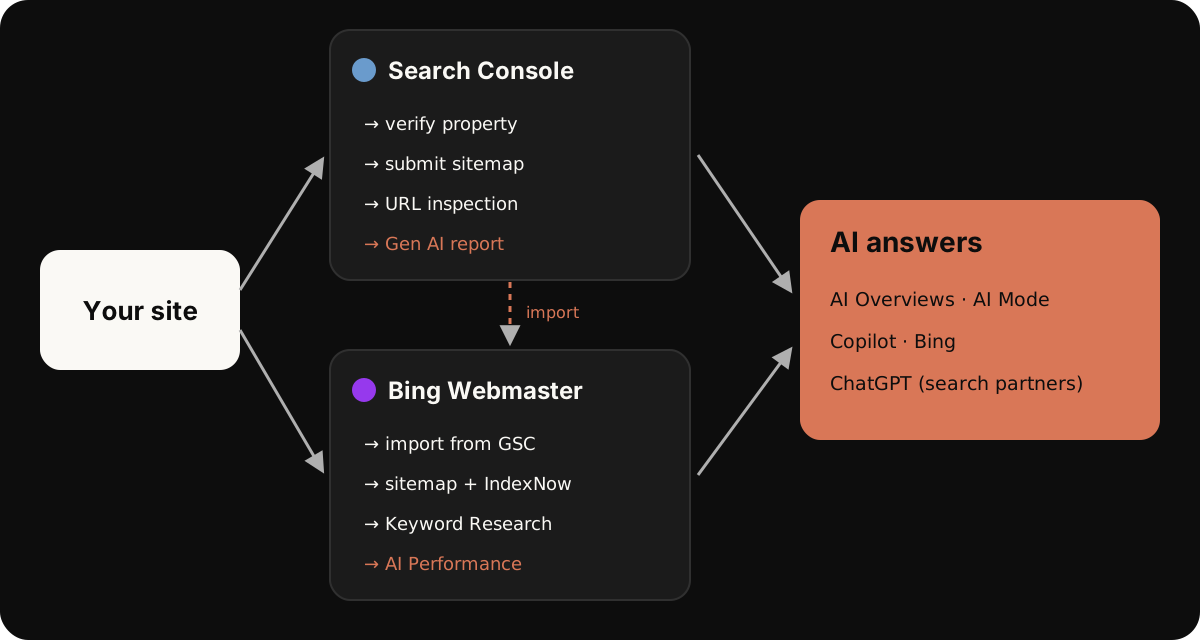
1. Add a property (2 min)
Go to Google Search Console, sign in and add a property. There are two types:3
| Aspect | Domain property | URL-prefix property |
|---|---|---|
| Covers | All subdomains and protocols (http, https, www, m) |
Only URLs starting with the exact prefix |
| Verification | DNS record only | Several methods (HTML tag, HTML file and others) |
| Use it when | You control your domain’s DNS | You don’t control DNS (e.g. workers.dev) |
2. Verify (3 min)
- Domain property: add the TXT record Search Console gives you at your DNS provider (on Cloudflare: DNS → Records → Add record → TXT).
- URL-prefix property: paste the
<meta name="google-site-verification" …>tag into your homepage<head>, publish, then click Verify.
3. Submit your sitemap (1 min)
Open Sitemaps, enter your sitemap URL (for example sitemap-index.xml or sitemap.xml) and submit.4 If your site has no sitemap, ask your agent to generate one; most static site tools do it automatically.
4. Check your key pages (3 min)
Paste each important URL into the URL Inspection bar at the top. You can see whether Google has indexed it, test the live version and request indexing.5 Do this for your homepage and every answer page you publish.
5. Find real questions (1 min, then weekly)
Open Performance → Search results → Queries. Filter for question patterns such as how, what, best, which, vs, price (the query filter accepts a custom regex, for example ^(how|what|best|which)\b). These are the questions people already use to find you, and the raw material for your answer pages. → Keyword research for GEO
6. Open the Generative AI report
Since June 2026, Search Console has a dedicated view of your impressions in AI Overviews and AI Mode, by page, country and device. It rolled out to all sites on August 31, 2026.6 Two details matter:7
- It shows impressions only: no clicks, CTR or position.
- If several of your pages appear in the same AI feature, that counts as one impression.
Note which pages already earn AI impressions. Those topics are working; build around them.
Common problems
- Blocked by robots.txt or a noindex tag on the page.
- A canonical pointing to another URL.
- The main text only appears after JavaScript runs. Most AI crawlers don’t run JavaScript, so keep important content in the HTML.8
Sources
-
Google Search Central, AI features and your website, December 10, 2025. ↩
-
Google Search Central, Optimizing your website for generative AI features on Google Search, July 10, 2026. ↩
-
Search Console Help, Add a website property to Search Console. ↩
-
Google Search Central, Build and submit a sitemap. ↩
-
Search Console Help, URL Inspection tool. ↩
-
Google Search Central Blog, Search Generative AI performance reports in Search Console, June 3, 2026. ↩
-
Search Console Help, Generative AI performance report (Search). ↩
-
Vercel, The rise of the AI crawler, December 17, 2024. ↩
FAQ
Domain or URL-prefix property?
If you control DNS, a Domain property is best: it covers every subdomain and protocol, but it can only be verified with a DNS record. On an address you don’t control DNS for, like a workers.dev subdomain, use a URL-prefix property with the HTML tag method.
My page isn’t indexed. What now?
Open URL Inspection, test the live URL and look for a reason: blocked by robots.txt, a noindex tag, a different canonical, or a server error. Fix it, then request indexing.
Does the Generative AI report show clicks?
No. It shows impressions only, with no clicks, CTR or position. Clicks from AI features are still counted in the overall Performance report.
Let your agent do this.
Give one line to ChatGPT or Claude and let the agent run the method step by step.
Read the GEO Asked method at https://geoasked.com/agent.md and run it for my brand, step by step. Ask me short questions first.